In the previous post I explained how to Use Cross-account access through AWS Console. Today I’ll show you how to do the same in the command line using aws-cli.
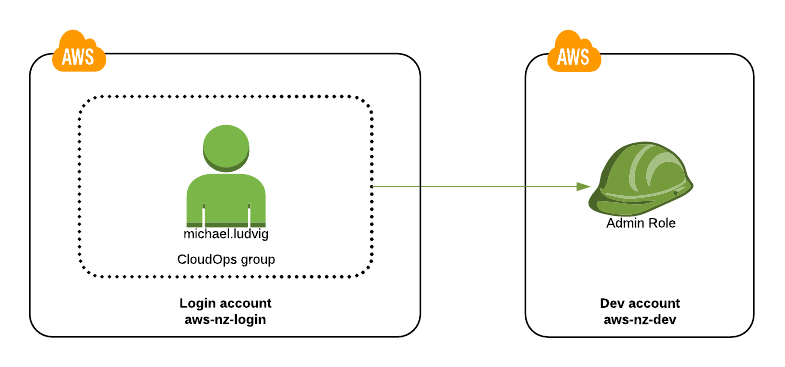
We’ve got Access and Secret keys for the Login account and want to use aws-cli to create and manage resources in the Dev account above.
Configure aws-nz-login credentials
First step is to configure aws-cli with credentials for the aws-nz-login account.
~ $ aws configure
AWS Access Key ID [None]: AKIABCDEFGHJKLMNOPQR
AWS Secret Access Key [None]: ZxCvBnMaSdFgHjKlQwErTyUiOp
Rename default profile to aws-nz-login
Change the [default] profile in $HOME/.aws/credentials to [aws-nz-login]. I tend to rename [default] so that I don’t inadvertently issue actions against a wrong account. Without [default] profile I always have to specify --profile ... which makes me think twice if I use the right account.
~ $ cat .aws/credentials
[default]
[aws-nz-login]
# These are aws-nz-login account credentials
aws_access_key_id = AKIABCDEFGHJKLMNOPQR
aws_secret_access_key = ZxCvBnMaSdFgHjKlQwErTyUiOp
Add aws-nz-dev profile
Open cat .aws/credentials in your favourite text editor and add a new [aws-nz-dev] profile at the end.
[aws-nz-dev]
role_arn = arn:aws:iam::123456789012:role/Admin
source_profile = aws-nz-login     # <-- reference to Login account
The number 123456789012 is the AWS Account ID of aws-nz-dev.
Check with aws-cli
To use the new profile with aws-cli use the parameter --profile aws-nz-dev.
~ $ aws --profile aws-nz-dev sts get-caller-identity
{
    "Account": "123456789012",
    "UserId": "AROA1B2C3D4E5F6G7H8I:botocore-session-1515151515",
    "Arn": "arn:aws:sts::123456789012:assumed-role/Admin/botocore-session-1515151515"
}
As we can see the Account ID is 123456789012 which is the Dev account number, yay!
From now on you can use aws --profile aws-nz-dev every time you you want to work in the Dev account.
Make it default
If you always want to work in the [aws-nz-dev] profile you have two options:
- Rename it to
[default], or - Set
$AWS_DEFAULT_PROFILE=customer-projectin your shell.
~ $ export AWS_DEFAULT_PROFILE=customer-project
~ $ aws sts get-caller-identity
... will be the same output as above, even without specifying --profile ...
Final few words
If you have a shell script that makes a lot of these cross-account aws-cli calls you may notice it runs quite slow. That’s because each call has to fetch a new set of cross-account credentials and that takes a second or so. In the next post I’ll show you a faster way to do that.