Working as a Senior AWS Consultant for one of the New Zealand’s leading AWS consulting providers means that I’m expected to have a hands on experience with as many AWS services as possible. In this series I will walk you through my first project that makes use of AWS IoT service.
Background
In one of our offices we’ve got a small server room with a handful of old servers – mostly sandpit stuff, nothing mission critical. The rack is cooled by an old unreliable Air Conditioning unit that sometimes stops cooling and sometimes even leaks water. Not good but not painful enough to warrant an installation of a new commercial grade cooling.
To work around the AirCon’s imperfections I decided to build a temperature and water leak monitor that triggers an email and SMS alert when the AirCon starts misbehaving again. And learn something about AWS IoT (Internet of Things) service on the way.
High level overview
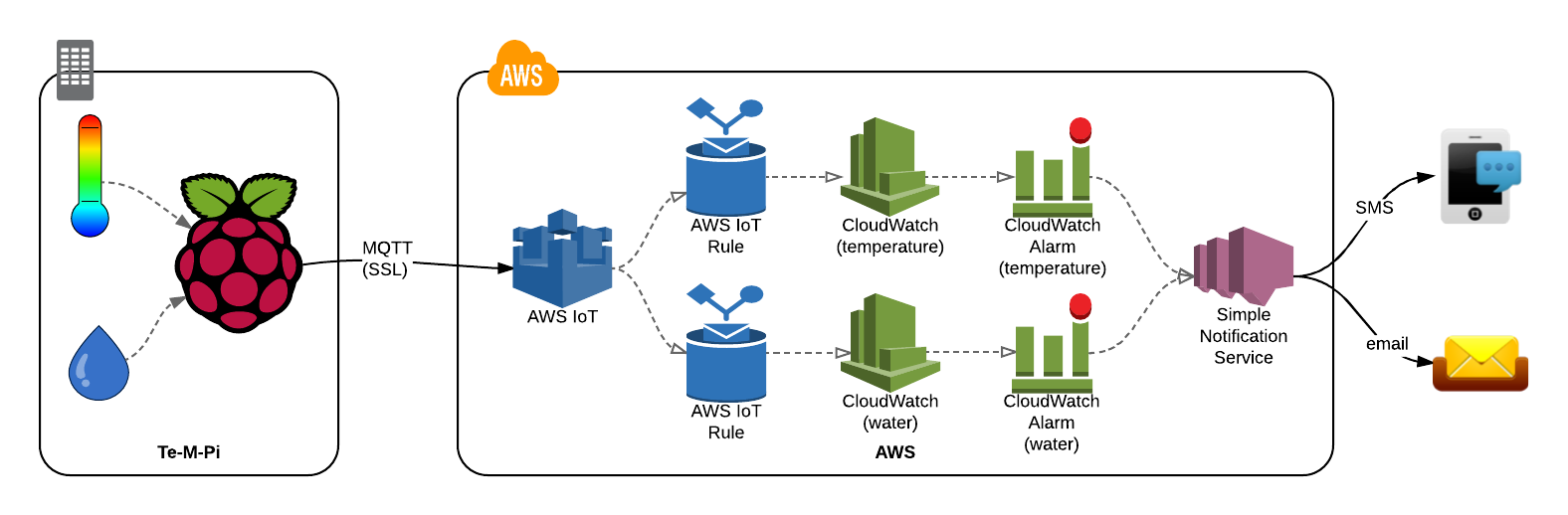
The architecture is pretty simple.
Raspberry Pi based device with temperature and moisture sensors is installed in the server room.
I call it Te-M-Pi (from Temperature, Moisture and Raspberry Pi).
Te-M-Pi periodically feeds its sensor readings to AWS IoT endpoint.
We are sending JSON data using a standard MQTT protocol over SSL.
AWS IoT forwards the measurements to AWS CloudWatch.
There we can create useful graphs.
CloudWatch Alarms are configured to publish a SNS Notification.
Whenever the preset thresholds are breached, for instance when the Temperature raises above 20°C, a SNS Notification is created.
SNS Notifications are dispatched by email and by SMS.
I want to be alerted when something goes wrong.
As a bonus Te-M-Pi also displays the latest temperature reading on a display.
That’s indeed entirely optional but it looks good.
One picture is better than a thousand words!
Decoupling
The above described architecture has one big advantage – the parts are interchangeable for similar ones as long as the interfaces remain the same.
It is not necessary to use Raspberry Pi as the sensor node. Any device that can publish JSON data to AWS IoT service over MQTT can be used in place of Te-M-Pi. In fact I built another little ESP32 based device that publishes its sensor readings in exactly the same format to the same AWS IoT MQTT Topic and its data are fed into the same CloudWatch Metrics.
Also it is not necessary to alert by email or SMS. AWS SNS (Simple Notification Service) can trigger all sorts of actions – from sending emails and SMS messages, through HTTP callbacks, through Mobile notifications to calling AWS Lambda functions that can than do truly anything you like to process the alerts. Perhaps remotely turn the AirCon off and on again in an attempt to reset it?
And finally it isn’t necessary to use AWS IoT at all – you may very well be served with a different MQTT broker like Mosquitto, configure the alerting logic in IFTTT and graph the data in Cacti. But I wanted to learn about AWS IoT so that’s what I will describe in this tutorial.
What’s next
In the next few posts we will explore all the components – the hardware, the MQTT interface and the AWS configuration.
I assume you will have some experience with Raspberry Pi, Python, basic electronics and some AWS exposure, although not necessarily IoT specific. Come back soon and have fun!