At around this time last year I wrote my first article about Mining Bitcoin and Ethereum on AWS and figured out that back then it wasn’t worth it. Over the past year the ETH price has increased from $450 to $4500 — let’s find out whether mining on AWS is finally profitable!

A lot has happened since I wrote my previous article about mining on AWS:
- The price of 1 ETH has increased 10x from $450 to $4500.
- The network difficulty increased 3-fold from 3.5P to 11P.
- AWS introduced many new GPU-enabled EC2 instance types.
- The end of Ethereum mining is looming with the move to ETH 2.0 and it is fast approaching.
Because of all those developments I decided to spend one lockdown weekend figuring out if mining Ethereum on AWS is profitable at last.
TL;DR
Nope it’s still not. Don’t do it. It’s better than a year ago though!
The best performance per dollar at the moment is achieved by the new g5.xlarge instances running at a spot price. G5 instances use the new NVIDIA Ampere A10g cards and as of now are only available in N. Virginia (us-east-1), Oregon (us-west-2) and Ireland (eu-west-1). More regions should be added over time.
The second best cost efficiency is the last year’s winner g4dn.xlarge — available in 15+ regions and offering NVIDIA Tesla T4 cards. Tried, tested and relatively cheap, it’s a reliable workhorse for crypto mining.
The third place goes to the new p4d.24xlarge sporting 8x top of the line NVIDIA Ampere A100 cards. However this one is an expensive, massive beast that even at a spot price costs almost $10/hour. It comes with 8 GPUs and 96 vCPUs which means that you may have to request a Service limit increase before you can run it. Good luck though — even trying to start it as an On-Demand instance often fails due to the lack of capacity in the regions. Let alone trying Spot —right now the chance of getting p4d.24xlarge on Spot is really slim.
Which brings us to the P3 family — p3.2xlarge to p3.16xlarge. With NVIDIA Volta V100 cards they are less cost efficient than the above but on the other hand they are more readily available in 10+ regions. This family also includes a new member p3dn.24xlarge which surprisingly secured the last place in this year’s list. Don’t bother — it’s about as powerful as p3.16xlarge but more expensive and harder to get at a spot price.
If your goal is to have at least some miners available and you’re willing to sacrifice some efficiency I suggest to start a fleet of the smaller instance types — g5.xlarge, g4dn.xlarge and p3.2xlarge — across a number of regions. That will give you a good chance to secure at least some instances.
Now, if you really really don’t care about costs you can even run them in On-Demand pricing — a number of people asked me to add that option to the CFN template over the past year so I did. There is a far higher chance to receive the instances On-Demand comparing to Spot. I’m still curious how do you get access to an AWS account where you really don’t care about costs at all and can mine with On-Demand instances — someone tell me please! Or better yet give me access too :)
To facilitate creating your mining fleets I have reworked the CloudFormation template — it automatically creates a list of the instance types available to you, based on the regional availability, and orders the list by the instance efficiency based on the current spot price and the measured hashrates. It will try running the best choice (typically g5.xlarge or g4dn.xlarge based on the region) and move on to the less efficient instances if the top-performer is not available for some reason. You can choose between Spot and On-Demand or start half-and-half and of course choose the instance types that the template should try starting for you.

From my GitHub repo
Enough said. Start mining by launching the CloudFormation template using a preconfigured link for us-east-1, us-west-2, or eu-west-1. For any other region go to my AWS Ethereum Miner GitHub repo and download the CloudFormation template from there.
Just be aware that it’s still not worth it — every $100 spend on AWS services will only give you at best around $65 in ETH. It’s better than it was a year ago ($20 in ETH / $100 spend) but still not profitable. More details below…
ETH 2.0 — the end of Ethereum mining?
Crypto mining is only possible on Proof-of-Work (PoW) blockchains , where we use CPU, GPU or a specialised hardware (ASIC) to do lots of fast calculations and in return get rewards in the form of the crypto coins. There are many controversies around PoW, mainly the fact that it’s very energy intensive.
Ethereum is abandoning PoW and is getting ready to switch to Proof-of-Stake (PoS), where new coins are not mined by the fastest miners but instead minted (not mined) by the owners of the existing coins who deposited (“Staked”) them to participate in the minting process.
This will be the so-called ETH 2.0 which promises many benefits for the ETH users but will very likely be the end of Ethereum mining as we know it. The switch will happen sometime in 2022 and there are plans to make mining impossible even sooner by detonating a “difficulty bomb”.
The bottom line is — if you want to make use of AWS for mining ETH don’t delay. This opportunity won’t be here forever.
New AWS instances: g5, p3dn, p4d
In the last year’s article I have explored the mining efficiency of various GPU-enabled EC2 instances. The aim is to achieve the highest possible hashrate per dollar of AWS spend. The last year’s winner was g4dn.xlarge instance running at a spot price in one of the 3 cheapest US regions — delivering the highest hashrate per dollar.
Over the last year AWS introduced 3 new GPU instance families: g5, p3dn and p4d. How do they fare?
| Instance Type | GPU Type | CPUs | Measured MH/s | Spot Price / hr | MH/s per $1 |
|---|---|---|---|---|---|
| g5.xlarge | 1x Tesla A10g | 4 | 56 | $0.30 | 186 |
| g4dn.xlarge | 1x Tesla T4 | 4 | 25 | $0.16 | 158 |
| p4d.24xlarge | 8x Tesla A100 | 96 | 1404 | $9.83 | 143 |
| g4dn.2xlarge | 1x Tesla T4 | 4 | 25 | $0.23 | 111 |
| p3.8xlarge | 4x Tesla V100 | 32 | 372 | $3.67 | 101 |
| p3.16xlarge | 8x Tesla V100 | 64 | 744 | $7.34 | 101 |
| p3.2xlarge | 1x Tesla V100 | 8 | 93 | $0.92 | 101 |
| g5.24xlarge | 4x Tesla A10g | 96 | 226 | $2.44 | 93 |
| g5.48xlarge | 8x Tesla A10g | 192 | 452 | $4.89 | 93 |
| g4dn.12xlarge | 4x Tesla T4 | 48 | 99 | $1.17 | 85 |
| g4dn.metal | 8x Tesla T4 | 96 | 204 | $2.55 | 80 |
| p3dn.24xlarge | 8x Tesla V100 | 96 | 740 | $9.36 | 79 |
Instance types ordered by MH/s per $1 — aws-gpu-2021.csv
As we can see the new g5.xlarge is taking the crown and the other newcomer p4d.24xlarge taking the 3rd place. Unfortunately there’s a catch with both: g5.xlarge is only available in 3 regions as of now and p4d.24xlarge is very hard to get hold of, whether on spot or even at on-demand price. The 3rd newly introduced instance p3dn.24xlarge didn’t go so well in and finished at the bottom of the list. Don’t bother, it’s not suitable for our needs.
The best bet to get the computing capacity you want is to request a few different instance types at the same time and let AWS fulfil it with whatever capacity it has available. My CloudFormation template has been modified in that regard.
So, is it worth it?
It’s better than last year but still not profitable I’m afraid. Last year we were earning roughly $20 in ETH for every $100 spent in AWS costs. Over the year the ETH price increased 10x — from $450 to $4500 but at the same time the network difficulty increased 3x from 3.5 P to 11 P, which means that it now takes 3x more effort to find a new block.
Do the maths — we should be earning 10x more but it takes 3x longer so the effective increase in the yield is only about 3x higher comparing to the last year. Or $60 in ETH for each $100 spent on AWS. Note that these are very approximate and volatile numbers but surprisingly they match the reality.
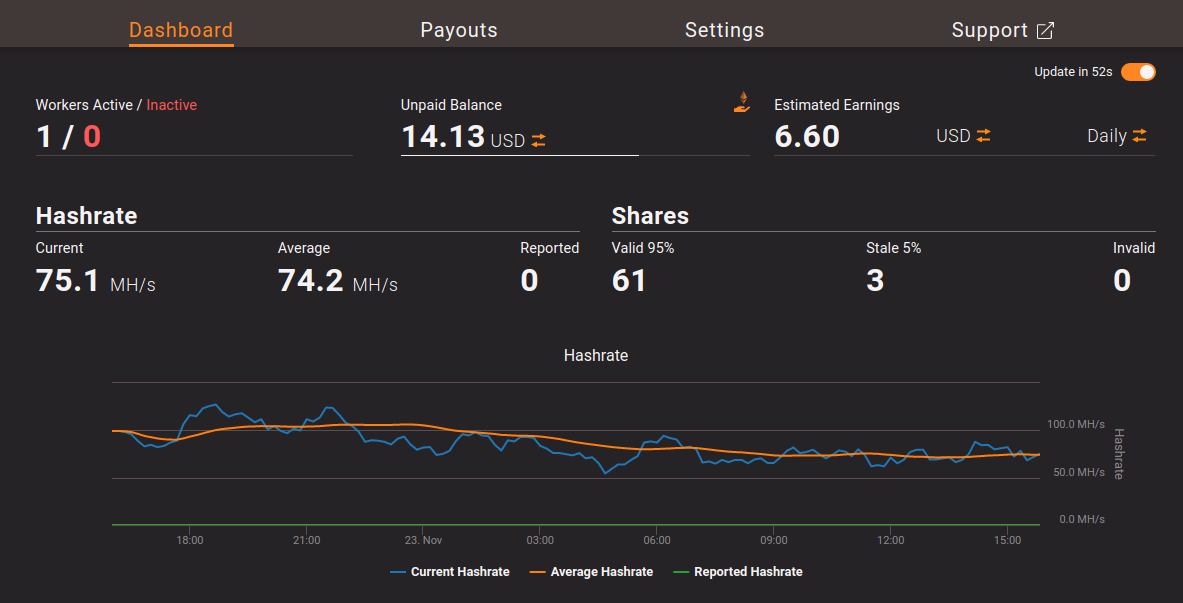
Ethermine — estimated earnings
The average hashrate in the image is 74 MH/s which matches 3x g4dn.xlarge costing $11/day at the spot price. At the same time the estimated daily reward is $6.60 — that’s exactly 60%! Even with the most cost effective g5.xlarge the return will only be around 65%. There you go.
Update: January 2022
AWS ETH mining may actually be profitable — check out my follow up post.
New AWS instance that makes ETH mining profitable
Mining Ethereum on AWS so far made no sense. Until now! One new AWS instance is the game changer and mining on AWS is…
Intermezzo — getting ready for Ethereum mining
If you are new to mining you may find it confusing and hard to understand what’s actually going on and how to start. Head over to my previous post for a discussion about mining efficiency, mining pools, wallets, etc. I won’t repeat the basics here, let’s get straight on to it!
To get started you’ll need a couple of things:
- Ethereum wallet — that’s where the payouts will be sent to.
If you don’t have one yet check out the Brave browser that comes with an integrated crypto wallet. Or install MetaMask — probably the most popular Ethereum wallet these days. It is available as a plugin for most browsers. - With the wallet configured note down your wallet address and have it ready. The wallet address is a long string starting with 0x, something like: 0x99b36B44…etc. You will need it when setting up the CloudFormation stack.
- AWS account — crypto mining on AWS can get very expensive very quickly. Make sure that the account owner is OK with that. Also be aware that brand new AWS accounts may have very low service limits and those will have to be increased first before you can spin up GPU instances. More about that later.
Once you have all the above ready continue to read about the convenient AWS Ethereum Miner CloudFormation template…
CloudFormation template
If you’re still not convinced that mining on AWS is not worth it and want to try it yourself or if you have access to a free AWS account with unlimited spend, then you can use my CloudFormation template to quickly spin up a few miners. They come up completely configured and mining from get go into ethermine.org pool where you can get payouts after earning as little as 0.005 ETH (~ $22) which is far less then in many other mining pools.
The template is created in such a way that it attempts to spin up a mix of different instances for the best chance to get at least some EC2s at the spot price, with the most efficient attempted first. It’s using a CloudFormation Custom Resource to gather the list of the instance types available in the current region, retrieve the current spot prices and to calculate the order of preference. Then it tries to start up enough instances to meet the Hashrate requested as the template parameter.
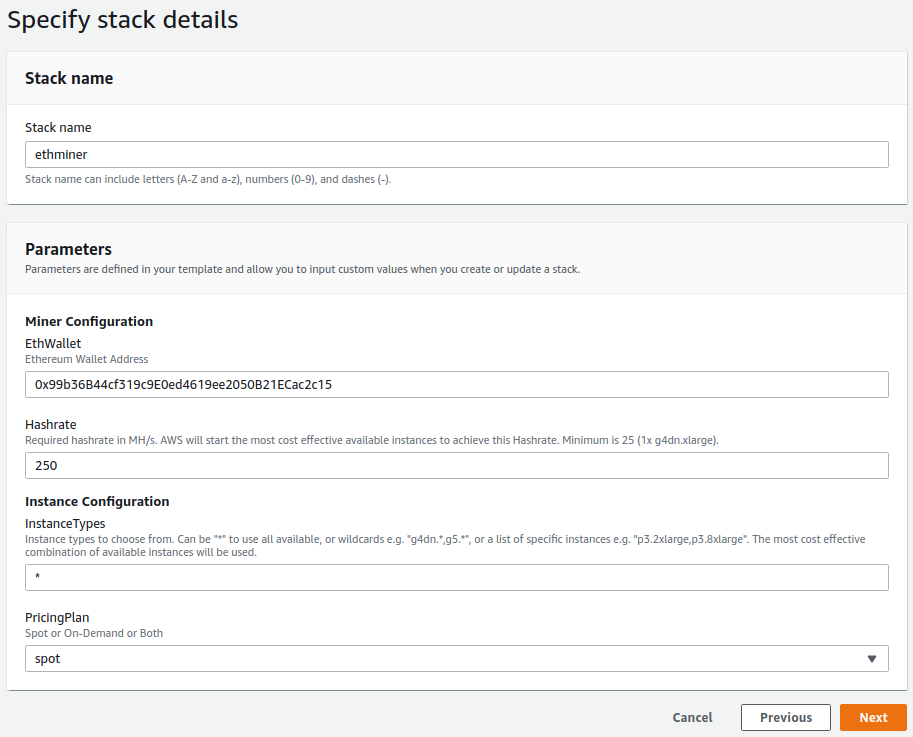
Important: It may take some time for the spot instances to come up. However if you don’t see any EC2 instances running after ~30 minutes then there’s something wrong. Go to the EC2 console page, scroll down to Auto Scaling Groups in the left hand side column and in the Activities tab find out what’s going on. It’s usually one of these two reasons:
- You’re held back by low service limits — see below how to increase them.
- There is not enough spot capacity in the region. We can’t do much about it, try a different region.
After the instances are started you can check your mining performance in the Ethermine dashboard — the URL is in the CloudFormation stack outputs. Note that it takes 15 to 30 mins for the hashrate to start coming up and even then it will look too low at first. That’s because the displayed value is an average over 30 mins (the “current” hashrate) and over 6 hours (the “average” hashrate). Let it run for at least a few hours to get a more accurate result and to earn some rewards. Ethermine lets you withdraw as little as 0.005 ETH (~ $22) for free over the Polygon network, but that’s a topic for another day.
Shameless plug: If you’ve got access to a free AWS capacity please consider running a few miners with my wallet address (the default in the CFN template) as a Thanks. Will you? :)
AWS Service Limits
New AWS accounts often don’t allow running any GPU instances at all. When you’ve got a new account they assume that you’re new to AWS and they don’t want you to spin up something expensive by mistake.
Therefore, before you can start mining, you may have to increase the EC2 service limits for G and P spot and eventually for on-demand instances if you’re planning to use them too.
Either raise the request through the Support page or use my handy script tools/service-limits.py that you can run from the AWS CloudShell to request a service limits increase in all relevant regions at once.
All the limits are set in terms of vCPU — it limits how many virtual CPUs your instances can use. For example if your limit for “All G Spot Instance Requests” is 64 it means that you can run 16x g4dn.xlarge, since each has 4 vCPUs. Or you can run one g4dn.12xlarge (48 vCPU) + 2x g5.xlarge (4 vCPU each) + 2x g4dn.xlarge (also 4 vCPU each), in total 64 vCPU. Makes sense?
The LAX mini-region, aka us-west-2-lax-1
The G4 instances are available in 15+ regions and also in the Los Angeles local zone, surprisingly for the same price as in its parent region Oregon. Apparently this is a little secret because even when there’s no Spot capacity in Oregon you can often get a spot g4dn.xlarge in LAX. Ssssh, don’t tell anyone!
To spin them up over there you have to do two things:
Enable the Los Angeles region for your account in EC2 ⇒ Settings ⇒ Zones, or follow this link to open the appropriate page.
Alternatively from the AWS CloudShell run this command:aws --region us-west-2 ec2 modify-availability-zone-group \ --group-name us-west-2-lax-1 --opt-in-status opted-inCreate new default subnets in the LAX local zone in the Oregon default VPC. You can run these two simple commands from the AWS CloudShell prior to creating the miner CloudFormation stack:
aws --region us-west-2 ec2 create-default-subnet --availability-zone us-west-2-lax-1a
aws --region us-west-2 ec2 create-default-subnet --availability-zone us-west-2-lax-1b
Then you can deploy or re-deploy the CloudFormation template and it will automatically pick up the new LAX availability zones.
See the GitHub discussion for more info.
Conclusion as December 2021
A lot has changed in the Ethereum mining world over the past year and many more changes are on the horizon. Likewise a lot has changed in the AWS Cloud space. In the end, considering all the factors the conclusion is clear: Ethereum mining on AWS is still not profitable, despite the ETH price being 10x higher than it was a year ago. At best you may earn some $65 in ETH for every $100 spent on AWS resources, that’s not a great deal. However if you’ve got access to a cheap or free AWS capacity, like many of my readers apparently do, now you’ve got the tools to get the most of it. Don’t delay, ETH 2.0 is coming!
Update: January 2022
Amazon released new instance types that actually make ETH mining on AWS profitable. Check out my follow up post:
New AWS instance that makes ETH mining profitable
Mining Ethereum on AWS so far made no sense. Until now! One new AWS instance is the game changer and mining on AWS is…