The Bitcoin mania has struck again. With the BTC and ETH prices at all times high many people look for ways to take part in the frenzy. Start mining on AWS today using our easy to use CloudFormation template. Or better not? Let’s find out…

Photo by André François McKenzie on Unsplash
Typically you can obtain Bitcoins and other crypto-currencies in one of three ways: by buying them, trading them or mining them. Here we will have a look at the latter option — mining crypto on AWS.
Crypto mining is a very computationally intensive adventure for which we need a PC with a high-end graphics card, GPU. That’s something that I don’t have unfortunately. However since AWS offers EC2 instances equipped with many different kinds of GPUs that we can take for a test drive with no upfront cost I decided to give it a go and try mining on this most popular cloud platform and see how rich I can get.
How to mine Bitcoins on AWS
TL;DR — don’t. After some research, I realised that to at least remotely effectively mine Bitcoins it’s no longer enough to have a GPU. I would need specialised single-purpose hardware called ASIC Miner. These are available from many vendors and cost thousands to buy. Not quite what I want to do at the moment.
So is this the end of it? Nope, of course not. There are still some crypto-currencies that can be somewhat effectively mined on GPUs. One such example is Ethereum. Let’s have a look at that.
Ethereum mining on AWS GPU instances
Don’t, really, it’s not worth it.
Still reading? Ok, ok, let’s explore the details. To start mining Ethereum we will need four things:
- Ethereum wallet for the payouts
- Mining software
- Join a mining pool
- Efficient hardware
TL;DR for the impatient
Read the January 2022 update:
New AWS instance that makes ETH mining profitable
Mining Ethereum on AWS so far made no sense. Until now! One new AWS instance is the game changer and mining on AWS is…
My CloudFormation template has been updated to support the latest and most cost effective GPU instance types (as of Jan 2022).

From my GitHub repo…
Launch the EthMiner CloudFormation stack and try for yourself.
ETH Wallet, Pool and the Mining software
The Ethereum Wallet is kind of an account number where we keep our crypto-currency balance. There are many ways to create one — online services, desktop software, or buying an extra-secure offline wallet. Read more about Ethereum wallets here. I chose to create mine on blockchain.org — for no particular reason to be honest. After all, this is just for testing so any service that can create a wallet will do.
Once the wallet is created note down its address, it will be a long string of numbers and letters, something like 0x99b36B[…]21ECac2c15.
The next piece of the setup is a Mining Pool. If I was mining on my own I could potentially be crunching the numbers for a long long time before finally cracking a new block. Sure, I would then get a high reward for it (typically around 2 ~ 3 ETH), but it may take a very long time with a very uncertain result. More effective and predictable way to earn crypto through mining is to join a mining pool.
The idea behind mining pools is simple — many miners all contribute their computing power to a common goal and if one of them happens to mine a new block the pool shares the reward between all the miners relative to their contribution. The more computing power you contribute the bigger share of the payout you get (simple arithmetic). Also the bigger the pool the more often the members mine a new block (simple statistics) and the more often the pool receives and distributes a new reward. In large pools, new blocks are mined every couple of minutes.
For my tests I chose to use ethermine.org pool — it is very easy to join, doesn’t require any registration and will pay out your share as soon as you accumulate as little as 0.005 ETH (ca $9 in February 2021) which is less than most other pools. That means that you won’t have to wait too long for your rewards to end up in your wallet.
Now for the software — the most popular at the moment seems to be ethminer available from GitHub. Tried, tested, works. Let’s go with that.
The ethminer program basically takes two parameters — the pool endpoint address and the worker ID, which happens to be the Wallet address that we created before. Both conveniently bundled into a single URI:
ethminer -P stratums://0x99b36B[...]ECac2c15@us2.ethermine.org:5555
So that’s the setup and the software side of things. Now, all we need is somewhere to run it.

Photo by Kelvin Ang on Unsplash
Choosing the right EC2 instance for mining
Amazon offers a number of different GPU instances equipped with different models of NVIDIA cards that obviously cost different amounts to run and provide different performance. That’s a lot of variables.
| Instance Type | GPU Type | Number of GPUs |
|---|---|---|
| g3s.xlarge | Tesla M60 | 1 |
| g4dn.xlarge | Tesla T4 | 1 |
| g4dn.2xlarge | Tesla T4 | 1 |
| g4dn.12xlarge | Tesla T4 | 4 |
| p2.xlarge | Tesla K80 | 1 |
| p3.2xlarge | Tesla V100 | 1 |
| p3.8xlarge | Tesla V100 | 4 |
Some AWS GPU instance types — aws-gpu-1.csv
We want the best bang for the buck, i.e. the best outcome for each dollar paid to AWS. How do we measure it though?
Each instance type is for our purposes defined by two variables:
- the cost per hour, and
- the hash rate it can generate
The hash-rate is measured in Mega Hash per Second — MH/s — and is one of the units of performance used in the blockchain networks. The more mega-hashes we crunch the bigger share of the pool rewards we get, simple as that.
Our goal is therefore to do as many mega-hashes as possible for as little cost as possible.
Update — end of 2021
I have published an updated research with new results — check it out!
Mining Ethereum on AWS — is it worth it?
The Ethereum price increased from $450 to $4500 over the past year. Does that make Ethereum mining on AWS finally…
Step 1 — measure the performance of different instance types.
Let’s spin up a few different instance types with different GPU types, run ethminer on them and record the reported hashrate.
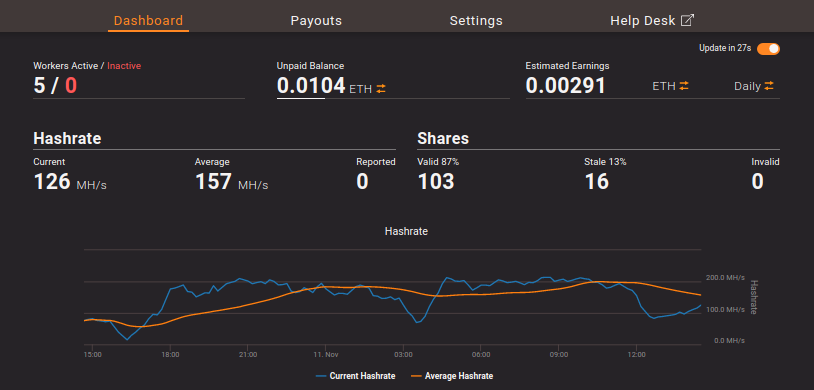
The results are surprisingly varied with the hashrate ranging from 1.8 MH/s in p2.xlarge to 312 MH/s in p3.8xlarge. I haven’t tested all the available instance types, however, the below selection provides a good overview.
| Instance Type | GPU Type | Number of GPUs | Measured MH/s |
|---|---|---|---|
| g3s.xlarge | Tesla M60 | 1 | 2.64 |
| g4dn.xlarge | Tesla T4 | 1 | 22.72 |
| g4dn.2xlarge | Tesla T4 | 1 | 22.9 |
| g4dn.12xlarge | Tesla T4 | 4 | 92.22 |
| p2.xlarge | Tesla K80 | 1 | 1.83 |
| p3.2xlarge | Tesla V100 | 1 | 78.01 |
| p3.8xlarge | Tesla V100 | 4 | 312.14 |
Measured MH/s — aws-gpu-2-ethminer.csv
The naive conclusion would be to choose the most powerful instance — p3.8xlarge — but is it really the most cost-effective one?
Step 2 — find the best prices
In AWS we may pay different prices for the same instance type, depending on the pricing plan and the region. For example in the case of g4dn.2xlarge the on-demand price can vary from $0.752/hr in the US East — Ohio or US West — Oregon regions, through $0.978/hr in Asia Pacific — Sydney, all the way up to $1.777/hr in Asia Pacific (KDDI) — Tokyo. That’s a massive difference!
Typically the old US regions — Ohio, N. Virginia and Oregon — are the cheapest.
The next factor affecting the cost is the price plan. The most expensive is on-demand at $0.752 per Hour in US East — Ohio as shown above. If we wanted to run the miner continuously for the next 1 or 3 years we could purchase a reserved instance and pay as little as $0.283/hr on a 3 years plan (saving of 62% off the on-demand price). But we certainly don’t want to commit to 3 years, not yet. We only want to test and see if / how mining on AWS works for us.
The best option is Spot pricing where Amazon offers excessive unused capacity at significant discounts. The Spot price can fluctuate with time, depending on demand and if it rises above what you’re willing to pay your instance will be terminated. But that’s OK, we only want to pay as little as possible. At the moment the spot price for g4dn.2xlarge in Ohio is $0.2256 per Hour — a massive 70% discount on the on-demand price!
All we need now is to find the spot prices of all our instance types in Ohio and put them in our table.
| Instance Type | GPU Type | Number of GPUs | Measured MH/s | Spot Price |
|---|---|---|---|---|
| g3s.xlarge | Tesla M60 | 1 | 2.64 | $0.2250 |
| g4dn.xlarge | Tesla T4 | 1 | 22.72 | $0.1578 |
| g4dn.2xlarge | Tesla T4 | 1 | 22.9 | $0.2256 |
| g4dn.12xlarge | Tesla T4 | 4 | 92.22 | $1.560 |
| p2.xlarge | Tesla K80 | 1 | 1.83 | $0.2700 |
| p3.2xlarge | Tesla V100 | 1 | 78.01 | $0.9180 |
| p3.8xlarge | Tesla V100 | 4 | 312.14 | $3.6700 |
Spot prices in Ohio — aws-gpu-3-spot.csv
Step 3 — the most cost-effective instance type
With the performance and prices collected we can calculate the performance per dollar, or even calculate the Mega-Hashes we can crunch per dollar. The more the better.
We’ll take the measured MH/s, multiply by 3600 to get MH per hour and divide by the spot price per hour to get Mega Hashes per Dollar.
The final results are in the last column…
| Instance Type | GPU Type | Measured MH/s | Spot Price | MH / $1 |
|---|---|---|---|---|
| g3s.xlarge | 1x Tesla M60 | 2.64 | $0.2250 | 42,240 |
| g4dn.xlarge | 1x Tesla T4 | 22.72 | $0.1578 | 518,326 |
| g4dn.2xlarge | 1x Tesla T4 | 22.9 | $0.2256 | 365,425 |
| g4dn.12xlarge | 4x Tesla T4 | 92.22 | $1.5600 | 212,815 |
| p2.xlarge | 1x Tesla K80 | 1.83 | $0.2700 | 24,400 |
| p3.2xlarge | 1x Tesla V100 | 78.01 | $0.9180 | 305,921 |
| p3.8xlarge | 4x Tesla V100 | 312.14 | $3.6700 | 306,186 |
Mega Hash per Dollar — aws-gpu-4-value.csv
Surprisingly the best value by far is g4dn.xlarge at almost 520 GH/$. The fastest instance type p3.8xlarge that won in absolute numbers is still over 40% less effective per dollar. The loser in our contest is p2.xlarge with measly 24 GH/$, which means that it’s 20x more expensive to get the same result.
Conclusion — g4dn.xlarge in Ohio, Oregon, or North Virginia provides the best value.
Step 4 — crank it up and get rich
Sure we can manually spin up a few instances and watch our ETH balance grow. Or we can use this little project as an opportunity to brush up some Infrastructure as Code (IaC) skills.
Check out the complete CloudFormation template that I published on GitHub with all the necessary resources to start mining — Spot price settings for different instance types, EC2 Launch Template that automatically configures each node and starts the miner, Auto Scaling Group that spins up the required number of nodes, SNS Topic for notifications about instance starts and shutdowns, etc.
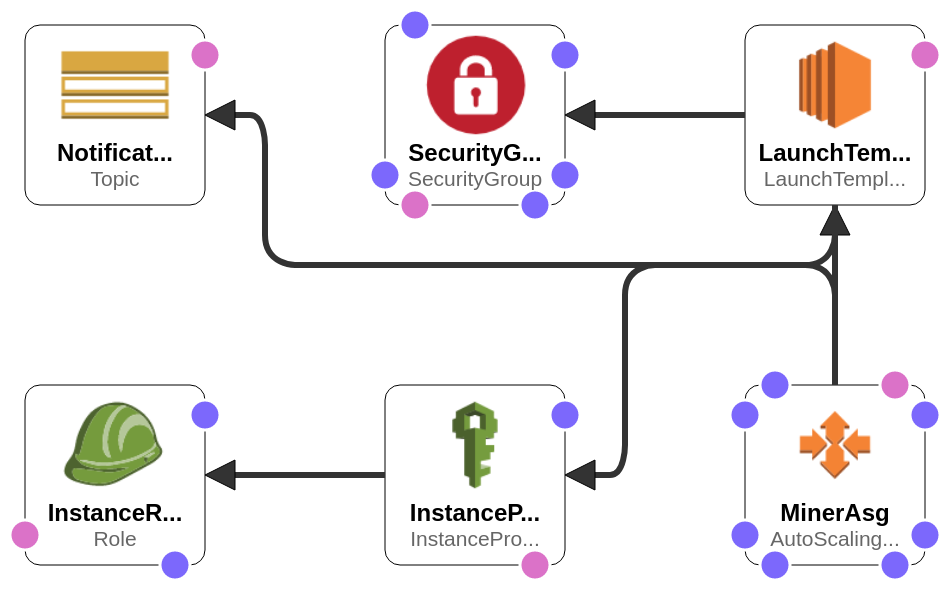
EthMiner CloudFormation template
To get the most out of the GPU-enabled instances we’ll use “Deep Learning AMI (Ubuntu 18.04) Version 36.0” that comes with all the necessary NVIDIA drivers preconfigured. That will save us a lot of setup work.
Also in line with the best practices, we won’t configure SSH access. Instead, use SSM Session Manager for interactive access to the instances using a web-based shell session. Or use the super-convenient command-line tool ssm-session for accessing the instance from a Linux or Mac shell.
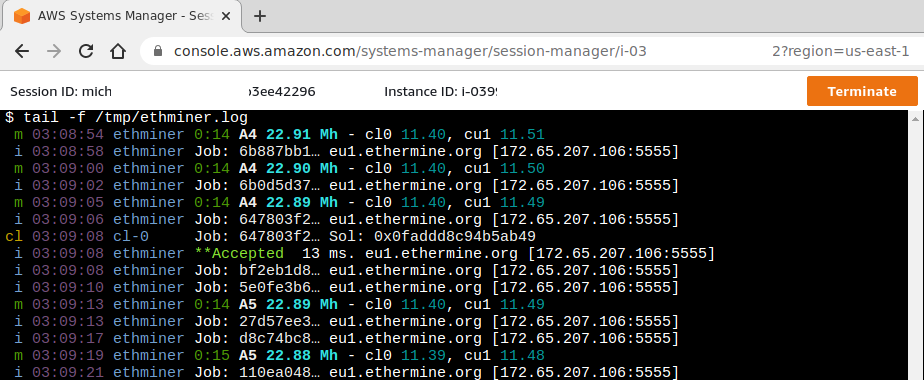
Once we’ve got access to the instance we can, for example, check out the miner log with tail -f /tmp/ethminer.log and verify the hash rate.
How much will I make?
Well, that’s a tough one. The payout depends on many factors — most importantly on the current Ethereum price, but also on the Ethereum network difficulty, the payout for a mined block, and on the current EC2 spot price of the instances that we use.
At the time when I was running my tests in November 2020, the price for 1 ETH was around $450. With that, the payouts from the pool were around 20% of the AWS cost. In other words for $100 spent on AWS costs, I got around $20 in Ethereums.
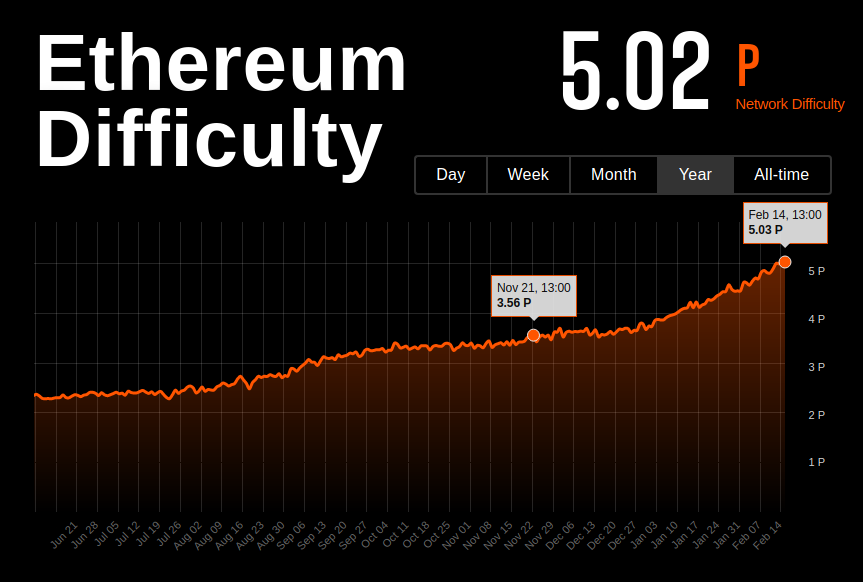
Update Feb ’21: From November last year the ETH price pretty much quadrupled to the current $1800. Does that suddenly give us 80% return on the AWS spend? That’d be nice but not so fast… With more miners in the Ethereum network the Network difficulty also increased 1.4x in the same time so the reward per GigaHash dropped by that factor as well. Since we’re talking approximate, volatile numbers that change every minute let’s just estimate that in February 2021 we should get roughly $50 to $60 back for each $100 spent on AWS costs, or -50% to -60% return. Still not a great investment.
It’s not worth it, don’t do it, you have been warned!!
Ah, wait, maybe read the updates first…
Update Dec ’21: A lot has happened since I first published this research a year ago.
- The ETH price increased from $450 to $4500
- AWS have introduced new more powerful instance types
- The end of Ethereum mining is coming soon with the switch to ETH 2.0
Check out my new up to date research: Mining Ethereum in AWS — is it worth it? to find out.
Update Jan ’22: One new EC2 instance makes ETH mining on AWS finally profitable. Read the latest update: The new AWS instance that makes ETH mining profitable and decide for yourself whether you give it a try :)