Customising Llama-2 for your task offers a cheaper and more secure LLM experience.

Image by author and DALL-E 3
The advancements in Large Language Models over the past few months unleashed some interesting opportunities for text processing automation. Let’s take a look, for example, at removing Personally Identifiable Information (PII) from free-form text data. Have a look at this call centre log (made-up example):
October 10, 2023, 2:15 PM, customer Maria Gonzalez called in to inquire about her mortgage loan payments. Agent Brian Clark confirmed the customer’s identity using a verification code sent to their mobile number 027-456-7890 and by confirming her home address as 45 Wellington St, Christchurch, 8010. […]
While identifying the dates, email addresses and phone numbers is usually quite easy, when it comes to people’s names, business names, street addresses and other unstructured data the traditional methods like regular expression often fall short. So what do we do?
LLMs understand our language and can help us out
Let’s look at the services like OpenAI GPT-4 first. We can ask it to edit the provided text and replace all names, addresses, dates and phone numbers with placeholders like {name redacted}, {address redacted}, {date redacted}, and so on.
GPT-4 is smart and understands the task very well. The output is exactly what we wanted:
{date redacted}, customer {name redacted} called in to inquire about her mortgage loan payments. Agent {name redacted} confirmed the customer’s identity using a verification code sent to their mobile number {phone number redacted} and by confirming her home address as {address redacted}. […]
That’s it, right? Job done! Well not so fast. There are 2 problems with the OpenAI service:
- Data privacy and compliance. We are dealing with PII data here. The OpenAI service is not designed, audited and approved to process sensitive information.
- It is expensive. GPT-4 is a really advanced model capable of doing heaps of complex and interesting tasks. And we pay a premium for those capabilities even if our job at hand is actually quite simple and could be performed by a much smaller and cheaper LLM.
Processing PII data with Llama-2-7b on Amazon SageMaker
Instead of using a public OpenAI API let’s look at running a private LLM on our terms and with our controls in place. One of the easiest ways to spin up an AI model is using Amazon SageMaker Jumpstart with the popular Llama-2 model.
Llama-2 is one of the most promising open-source models in the current GenAI landscape. Unfortunately out of the box, the 7B version — the smallest and cheapest to run — is not smart enough to reliably edit our call logs the way we want it.
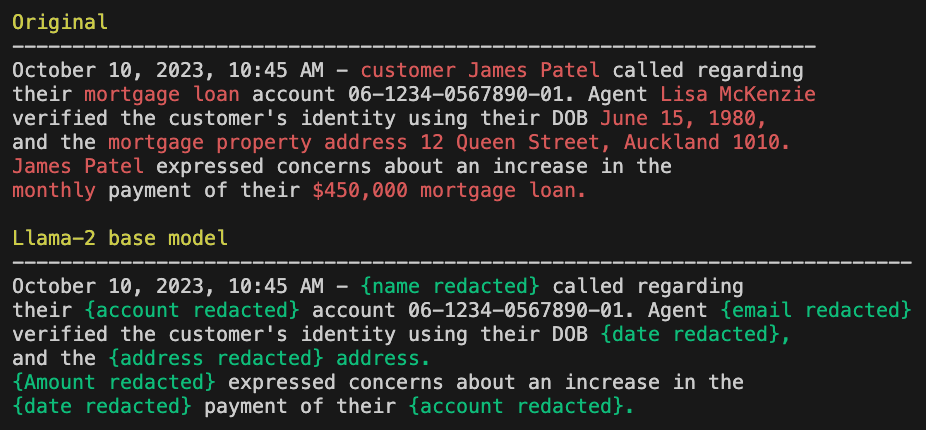
Llama-2 base model performance. The “Original” has made-up PII for obvious reasons.
It got the idea all right but fell short in the execution — it missed the date and the account number while on the other hand, it replaced lots of text that should have stayed. Let’s see if we can teach it / fine-tune it to do a better job.
Fine-tuning is a process where we give the “base model” several examples of the expected behaviour — i.e. prompt + original text + redacted text in our case — and tell it to learn from these examples. Because Llama-2-7b already understands the English language it can tell what is a name, what is a date and what is a street address, we don’t have to teach it that level of language understanding. All we need is to show it how exactly we expect our task to be fulfilled. And we’ll do it with the help of Amazon SageMaker.
Amazon SageMaker Jump Start
Deploying and fine-tuning an open-source LLM can be tricky. Different models have different requirements and use different frameworks, settings, PEFT and LoRA configs and so on. Doing it from scratch is a pain in the backside.
Amazon SageMaker Jump Start to the rescue! Jump Start provides pre-configured ready-to-use solutions for various text and image models, including all the Llama-2 sizes and variants. Deploying Llama-2-chat with SageMaker Jump Start is this simple:
from sagemaker.jumpstart.model import JumpStartModel

model = JumpStartModel(model_id="meta-textgeneration-llama-2-7b-f")
predictor = model.deploy()
So easy! Behind the scenes, SageMaker locates the Llama-2-7b-f base model files, spins up a preconfigured container on a suitable GPU instance and exposes it as a secure authenticated endpoint that SageMaker can use for inference.
Unfortunately, this is the base model which is not good enough for our needs as we have seen in the example above. Let’s dive into fine-tuning our own Llama-2 version.
Fine-tune Llama-2 with Amazon SageMaker
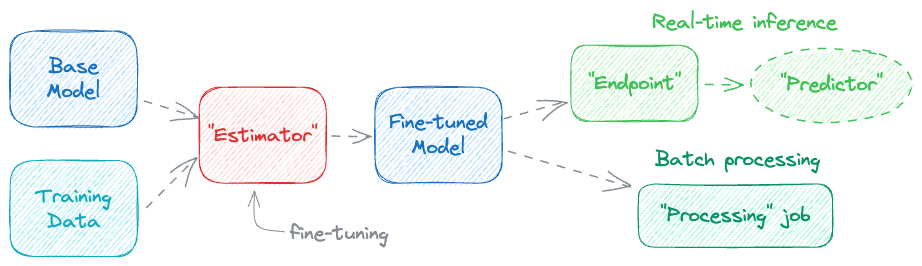
The actual fine-tuning is done through an Estimator class that spins up a training job with the base model, feeds it the training data as an input and in the end creates a fine-tuned model as the output. With the fine-tuned model we can start an Endpoint and interact with it through a Predictor.
“Ground truth” training data
The examples that the model should learn from are usually called the Ground truth. We will need a couple hundred of the original + redacted text pairs for the tuning job. Here are some ways to generate them:
- Manual editing. The good old way, open a text editor and edit a few hundred call logs. See you in 2 weeks.
- Amazon Ground Truth. Similar to the above, but the task can be distributed across trusted workers through an easy-to-use web interface.
- AI-powered data preparation. We may be able to use a “smarter” LLM to generate the training dataset for fine-tuning the smaller “dumber” LLM for a specific task. The smarter LLM may be GPT-3.5 or GPT-4 if your data governance permits, or a SageMaker-hosted Llama-2-70b if you are dealing with sensitive PII data.
One way or another we have to generate a few hundred examples and save them into training.jsonl file (JSONL = one JSON object per line).
{ "original": "Hello Michael", "redacted": "Hello {name redacted}" }
{ "original": "Hi Jane, your package was sent to 123 Some St, Big City", "redacted": "Hi {name redacted}, your package was sent to {address redacted}" }
{ ... and a few hundred more ... }
The training job will automatically split this data set into training and evaluation batches, by default 80:20. It’s a good idea to hold out a portion of your data, let’s say 10%, for verification after the training is complete. Keep it aside in holdout.jsonl.
Prompt template
As mentioned above the LLM learns from a triplet of prompt + original text + redacted text. We could include the prompt in the training data directly but that would lead to a lot of repetition. Thankfully the JumpStart container can combine a provided template with the training data before feeding the training process. Here is an example template.json with the prompt:
{
  "prompt": "### Instruction:\nRedact all PII data from the Context.
             Replace all names with {{name redacted}}, emails with
             {{email redacted}}, addresses with {{address redacted}}, etc.
             Respond with the redacted text only.\n\n
             ### Context:\n{original}\n\n### Response:\n",  <<< {original} gets replaced from training.jsonl
  "completion": "{redacted}"                                <<< and {redacted} as well
}
The training task will apply the template.json to each training.jsonl line to create the training data. Then during the evaluation phase, it will compare the generated output with the expected completion, i.e. with the ground-truth redacted text.
Both training.jsonl and template.json should now be uploaded to S3 for the training job to use.
Let’s train!
Now the fun begins. With the training data ready we can configure and run the training job.
from sagemaker.jumpstart.estimator import JumpStartEstimator

# S3 directory where train.jsonl and template.json are stored
S3_PATH="s3://sagemaker-us-east-1-123456/data/train/"

# Create the "Estimator"
estimator = JumpStartEstimator(
    model_id="meta-textgeneration-llama-2-7b",
    instance_type="ml.g5.12xlarge",   # Training needs a bigger instance
    environment={"accept_eula": "true"},        # Accept Llama-2 license
)

# Set hyperparameters - don't worry about this for now
estimator.set_hyperparameters(
    instruction_tuned=True,
    epoch=10,
)

# Run the training job (this may take an hour or more)
estimator.fit(
    inputs={"training": S3_PATH.strip("/")},
    wait=True,
    logs="All",
)
Sit back and relax. Or intently watch the logs as they start coming in…
INFO:sagemaker:Creating training-job with name: meta-textgeneration-llama-2-7b-2023-10-12-13-20-08-051
2023-10-12 13:20:08 Starting - Starting the training job...
2023-10-12 13:20:24 Starting - Preparing the instances for training......
2023-10-12 13:21:32 Downloading - Downloading input data...............
2023-10-12 13:23:53 Training - Downloading the training image.............
2023-10-12 13:28:24 Training - Training in progress....
While we wait for the training to complete let’s discuss a couple of points.
- The training process automatically utilises Parameter Efficient Fine Tuning (PEFT) and Low Rank Adaptation (LoRA) to make the tuning faster and more efficient.
- We are training our model to follow the given instructions (“Remove PII from …”) and therefore we have to set the
instruction_tuning=Truehyper-parameter. This is needed for the template format that we use. - The list of all Llama-2 on JumpStart hyper-parameters is documented in the llama-2-finetuning.ipynb Jupyter notebook under 3. Supported Hyper-parameters for fine-tuning.
We will talk more about hyper-parameters in the next post when we look at Amazon SageMaker Hyper-Parameter Tuning. Until then it’s enough to know that hyper-parameters are settings that affect the model training in some way. We are mostly using the defaults for now.
Deploying our fine-tuned model
After an hour-long wait, the training has finally completed and now it’s time to deploy our new model to an endpoint. Again it’s a simple one-liner:
predictor = estimator.deploy(
    # Inference can be done on a smaller instance
    instance_type="ml.g5.2xlarge",
    # Name the new model and endpoint the same as the training job, optional
    endpoint_name=estimator.latest_training_job.name,
    model_name=estimator.latest_training_job.name,
)
It may take about 5 to 10 minutes for the model and endpoint to get ready. Be aware that from this moment on we are being charged ($1.212/hr for ml.g5.2xlarge as of today) until such time when we delete the endpoint with predictor.delete_endpoint(). Keep that in mind!
Inference a.k.a. Prediction
Now let’s use the Predictor to get some outputs from our new fine-tuned LLM. Llama-2 requires the input in this format:
sys_prompt = """
Redact all PII data from the Context. Replace all names
with {{name redacted}}, emails with {{email redacted}},
addresses with {{address redacted}}, etc.
Respond with the redacted text only.
"""

text_original = """
September 20, 2023, 10:45 AM - customer James Patel called regarding
their mortgage loan account 06-1234-0567890-01. Agent Lisa McKenzie
verified the customer's identity using their date of birth June 15, 1980,
and the mortgage property address 12 Queen Street, Auckland 1010.
James Patel expressed concerns about an increase in the monthly
payment of their $450,000 mortgage loan.
"""

payload = {
  "inputs" = f"""
    ### Instruction:
    {sys_prompt}
    ### Context:
    {text_original}
    ### Response:
  """,
  "parameters": {
    "max_new_tokens": 300,
    "temperature": 0.1,
}
With the payload ready we can use the Predictor to call the Endpoint:
raw_response = predictor.predict(
    *payload,
    custom_attributes="accept_eula=true",  # Accept Llama-2 license
)
output = raw_response[0]["generation"]
And just like that, we’ve got a redacted text with the sensitive information correctly removed:
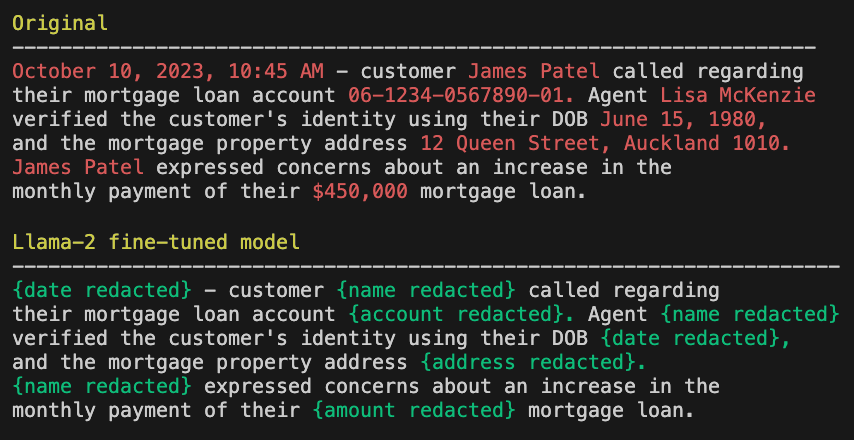
Fine tuned Llama-2 — much better performance
Key learnings
- It is surprisingly easy to use Amazon SageMaker JumpStart for fine-tuning one of the existing baseline foundation models like Llama-2.
- Relatively small number of training examples, in the order of hundreds, is enough to fine-tune a small 7B model to perform a well-defined task on unstructured text data.
- All data and traffic stays private in our AWS account, no public APIs with questionable ToS are used.
- Once the model is fine-tuned it can be far more cost-effective to use compared to OpenAI or other pay-per-token services.
- And lastly: look beyond the usual text summarisation, Q&A or GPT-powered chatbots. Large language models have a lot more to offer!
In the next post, we will have a look at Amazon SageMaker Hyper-Parameter Tuning — a convenient way to get the best results from your training tasks. Follow me and stay [fine-]tuned :)