
The last time I wrote about crypto mining on AWS we were still before “The Merge” — the (in)famous 2022 event when Ethereum switched from Proof of Work to Proof of Stake which spelled the end of ETH mining. The lucky people with free AWS accounts then switched to mining Ethereum Classic (ETC) or Ethereum POW (ETHW) but these were very unprofitable, yielding perhaps 10% or 20% max on a good day. And that’s not 20% profit, that’s getting $20 in crypto for $100 spent in AWS costs. Not a good deal.
Eventually it turned out that some other crypto coins became a little more profitable — Ravencoin (RVN) leading the pack, with Ergo (ERG) not far behind, followed by Ethereum Classic (ETC), Kaspa (KAS) and others. They still weren’t profitable to mine, but if you access to a discounted or free AWS account it may have worked.
For that reason I kept getting requests to update my AWS Ethereum Miner templates and add a support for RVN, ERG, KAS, ETC, etc.
TL;DR — here you go: AWS Crypto Miner
Now what about the Bitcoin (BTC) mining promised in the blog title? I’m glad you ask! Here’s the twist: Get paid in Bitcoin for altcoin mining. In short we can get our altcoins payouts converted to BTC and sent to our Bitcoin wallet rather then to the native RVN or ERG wallets.
Why would we do that? It’s simple — if I mined $1000 in Ravencoin a year ago and kept the RVN it would be worth $515 today. But if I got it paid out in BTC it would now be worth $1687. Similar story with ETC, ERG and pretty much any other altcoin.
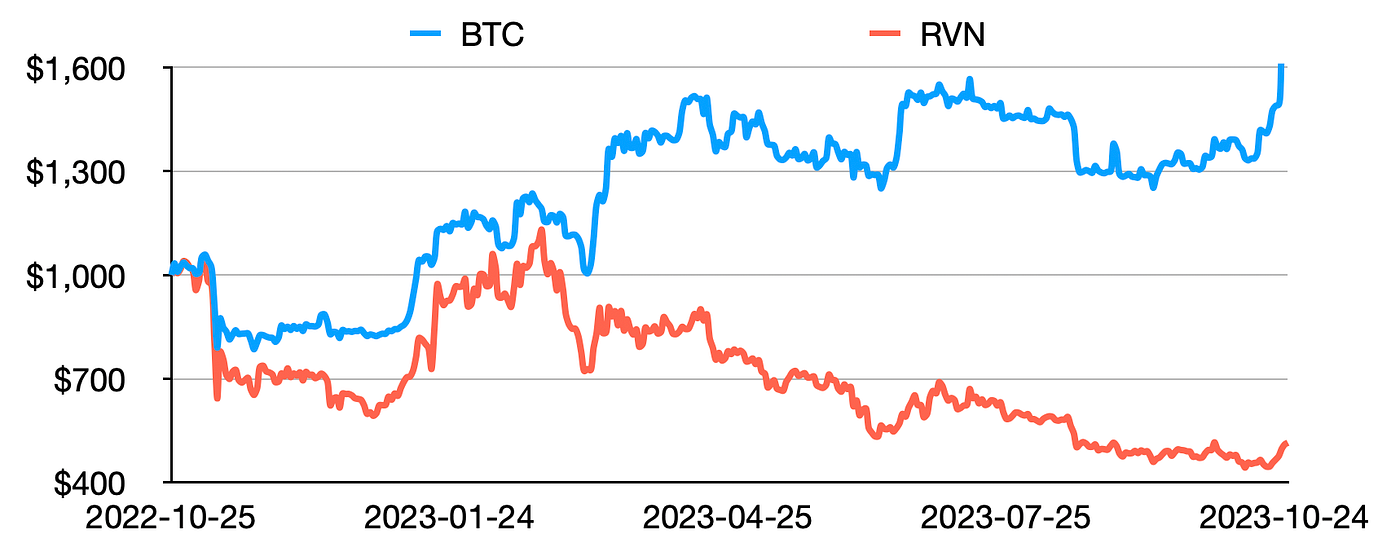
$1000 in BTC vs RVN over the last year
Bitcoin typically performs way better than the altcoins in the long run, whether you like it or not. But then of course the choice is yours — BTC payouts are just an option, my template supports the native coins payouts as well.
AWS Crypto Mining How-To
We will need 2 things to start:
- Bitcoin wallet where we get the BTC address for the payouts. Best to use one of the non-custodial wallets that give you a full control over our funds. For example Guarda, or Electrum, or even better a hardware wallet like Ledger or Trezor.
- AWS account where we’ll run the miners. Be careful! This can get very expensive very quickly and the returns may not be what you hoped for. You have been warned :)
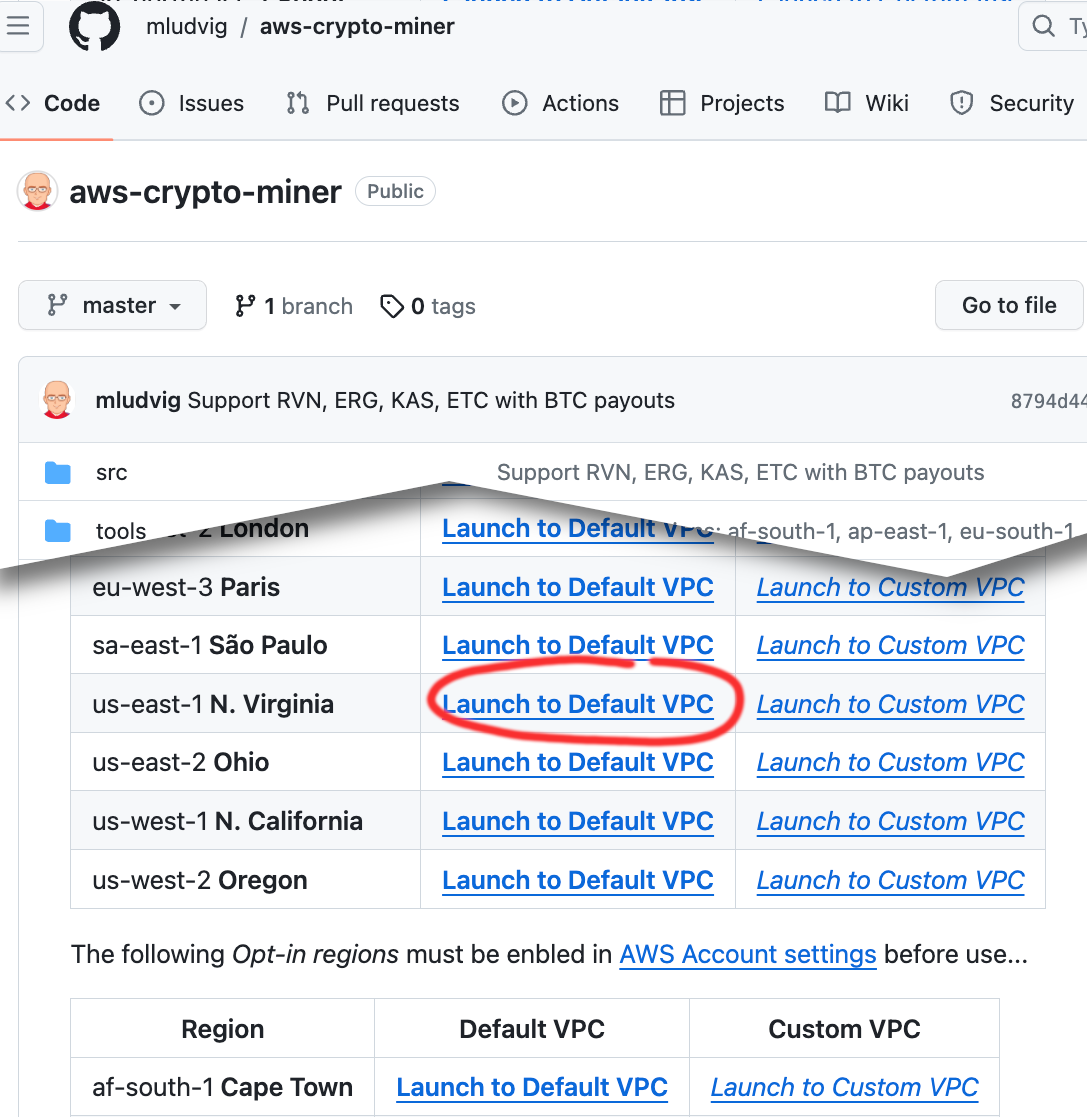
Now go to the AWS Crypto Miner page and click the Launch link for the region where you’re planning to mine.
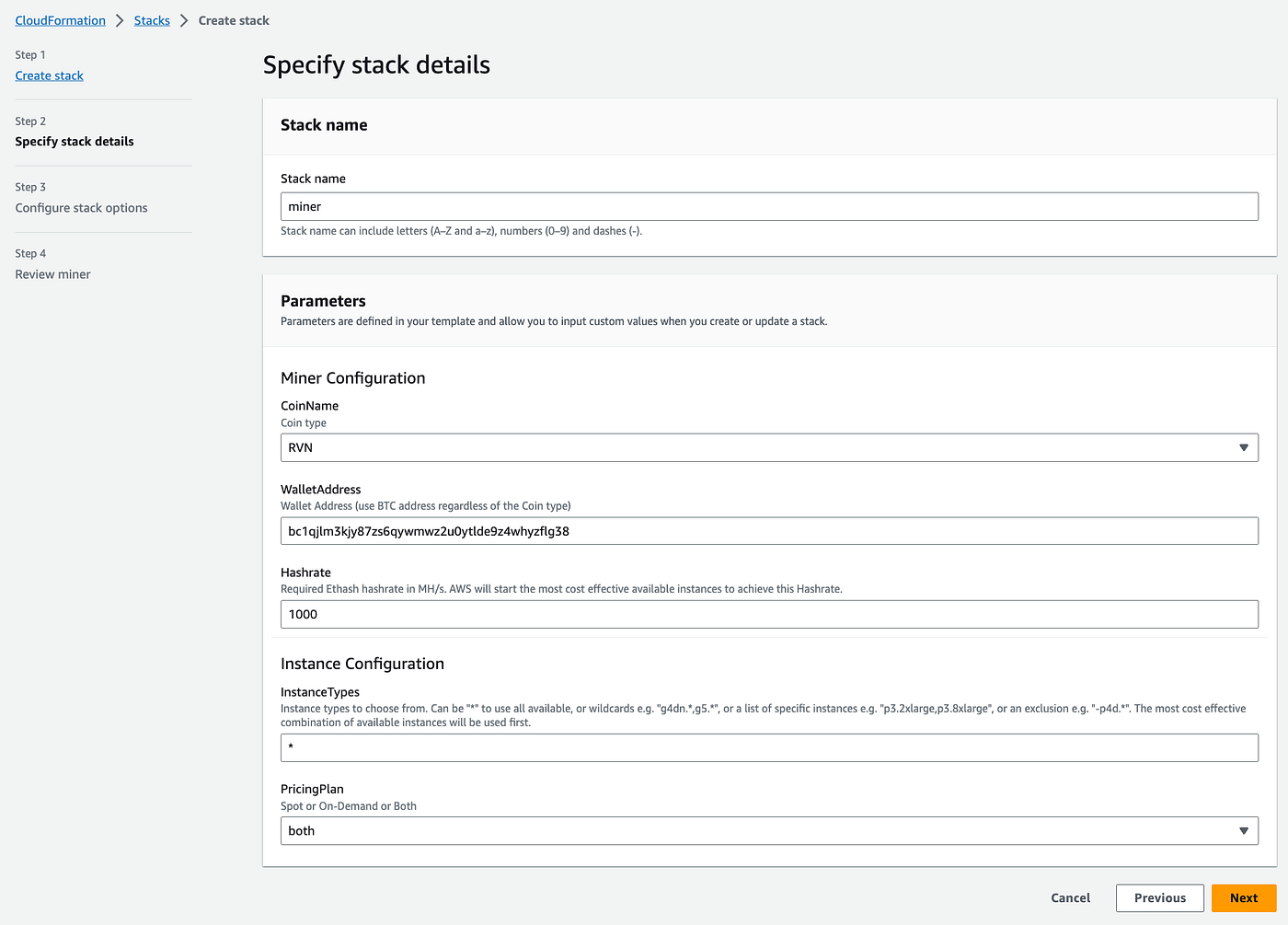
On the next screen confirm the CloudFormation stack a name (by default “miner” but make up what you want), choose the coin to mine — the default RVN (Ravencoin) is a good start, and put in your BTC or RVN wallet address.
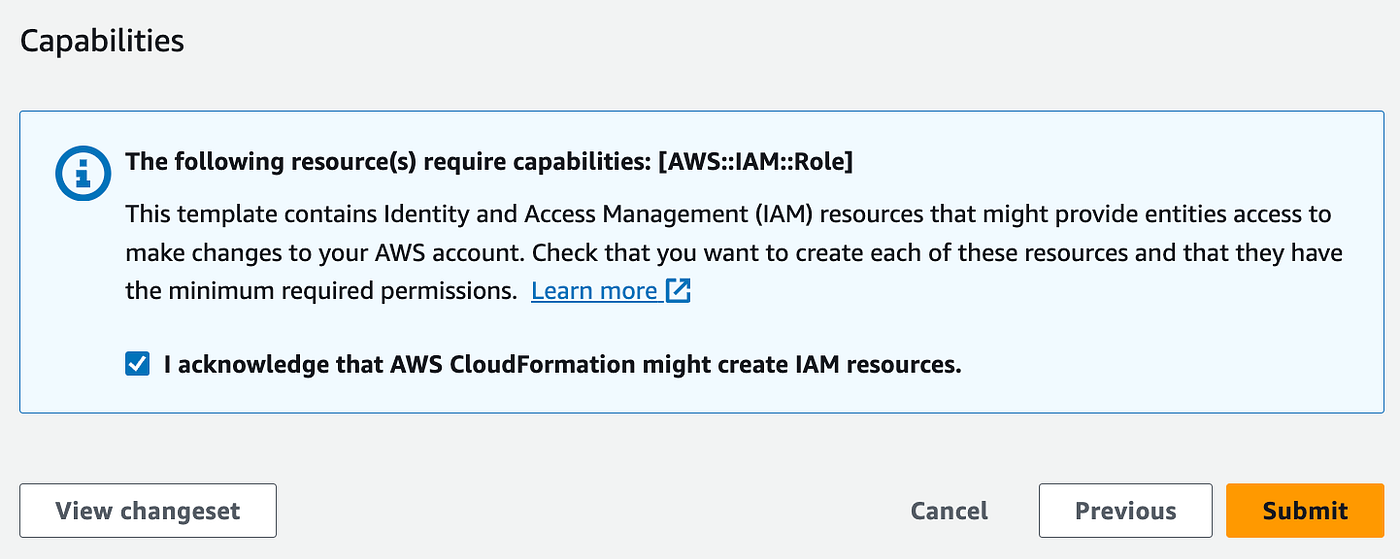
Then go through the rest of the screens, confirm that the stack can create IAM Role for the EC2 instance and click Submit.
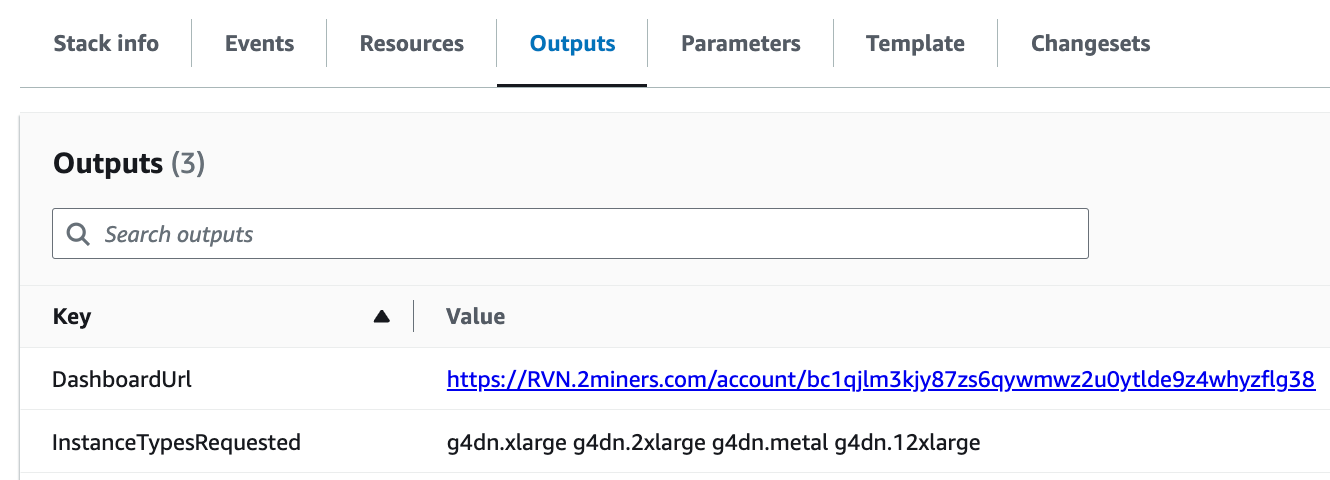
A few minutes later we should have the GPU instances running and after about half an hour we will start seeing the mining progress in the 2miners dashboard. Find the dashboard URL in the stack outputs.
So easy! Or is it?
Help! No instances are starting up!!
Ok, I hear you, sometimes things don’t go that smoothly. If you’ve been waiting for 10 or 20 or more minutes and still see no instances in the console it pays to investigate.
Navigate to the very bottom of the EC2 console and in the right-hand side bar click Auto Scaling Groups. From there select the miner-Asg-XYZ123 or whatever the name of your group is and check out the Activity tab. Some possible reasons are…
Quota exceeded — new AWS accounts by default can’t start GPU instances without requesting a Quota increase first. To request the increase search for “Service Quotas” in the top bar search box, then in AWS Services open Elastic Compute Cloud (EC2) and look for “g and vt”. If the “Applied quota value” is 0 or too low raise a request to increase it.
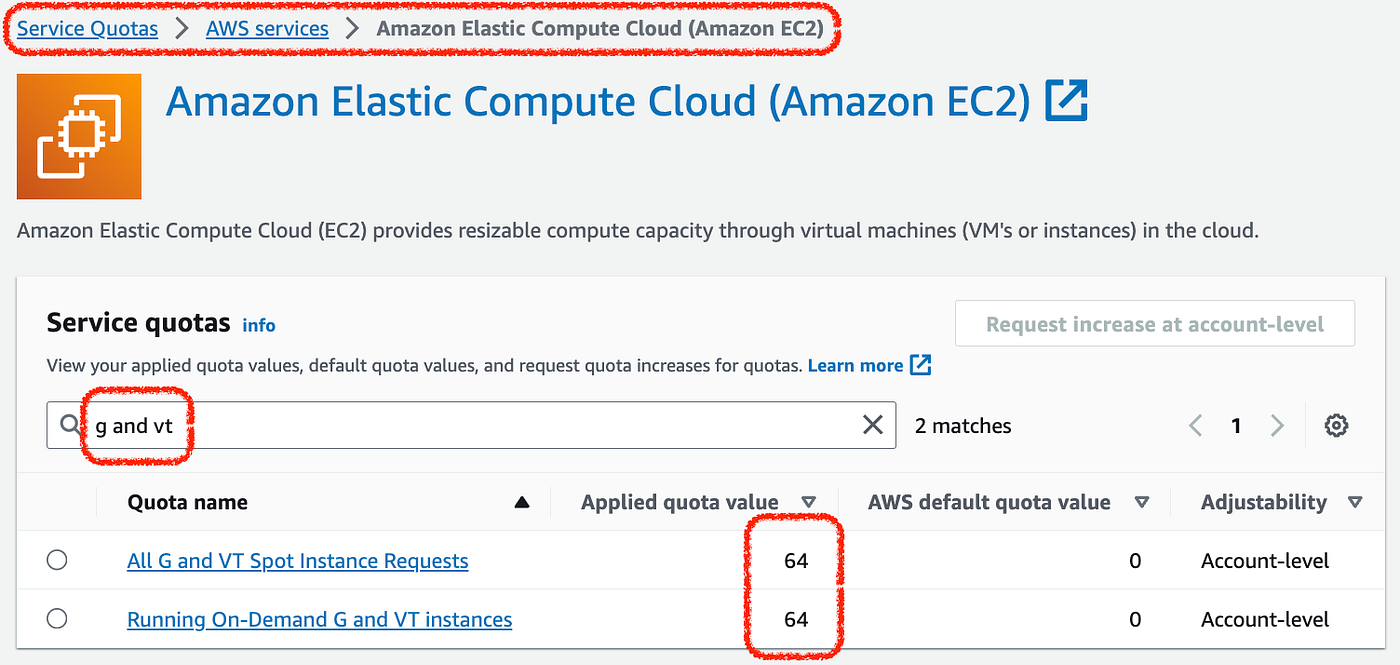
Service Quotas for GPU instances
AWS is not likely to approve a big increase at once, it’s better to go by small increments 0 -> 16 -> 64 for example. Also note that you’ll have to do this in each region separately.
Region capacity issues — demand for cloud GPUs is consistently high thanks to both crypto mining and AI-related usage. In turn there is often no spare capacity for spot instances. In that case there are three options:
- wait a day, or two, or more and try again, or
- try a different region, or
- use on-demand instances rather than spot, but that can be very very inefficient.
In most cases going into a different region is the easiest answer.
Help! I’m losing money!!
Well, yes, if you’re paying the full price for the AWS services you’re not likely to make a profit. But if you’ve got access to a free AWS account, or have heaps of AWS credits that are about to expire, you may be able to extract some Bitcoins. How much can you make in today’s market?
Profitability analysis
I’m working on a detailed profitability analysis, similar to what I did a while back in the good old Ethereum mining days.
Mining Ethereum on AWS — is it worth it?
The Ethereum price increased from $450 to $4500 over the past year. Does that make Ethereum mining on AWS finally…
Follow me here on Medium so you don’t miss it when I publish the Profitability analysis post. Until then keep in mind that you’re not likely to make money with mining Bitcoin on AWS!
Happy crypto mining :)