ZoneMinder is a popular open-source video surveillance system. AWS Rekognition is an easy to use image recognition service from Amazon. Together they are a perfect match.
Photo by Bernard Hermant on Unsplash
ZoneMinder is a remarkably versatile system. It’s compatible with pretty much any IP camera that you can buy, you can run it on your own server and therefore you don’t have to trust your security video feeds to some random vendor with dubious security standards. Being open-source there are no monthly “subscription fees” nor any expensive optional “power packs”. It’s all free.
ZoneMinder of course supports many advanced features like motion detection or image recognition. Typically I only want to be alerted when there’s a person at my front door, not when the dog runs around or when the wind moves some leaves.
Motion detection in its basic form is not very difficult — take a frame (=still image) from the camera and compare it with the previous frame. If they are sufficiently different we may conclude that something has moved. Unfortunately, it’s not always true. Sometimes for example the clouds that suddenly obscure the sun make a subsequent image look different enough from the previous one for the motion detection algorithm to raise an alarm. You or I can immediately tell that it’s just a shadow, but the computer can’t. Unless we use image recognition.
Image recognition/object detection algorithms look at the image and can tell us what’s on it and where is it. Perhaps there’s a person in the centre, a car at the back, a dog on the left, and a plant on the right. With that knowledge, we can do a more informed decision whether to raise an alarm or not.
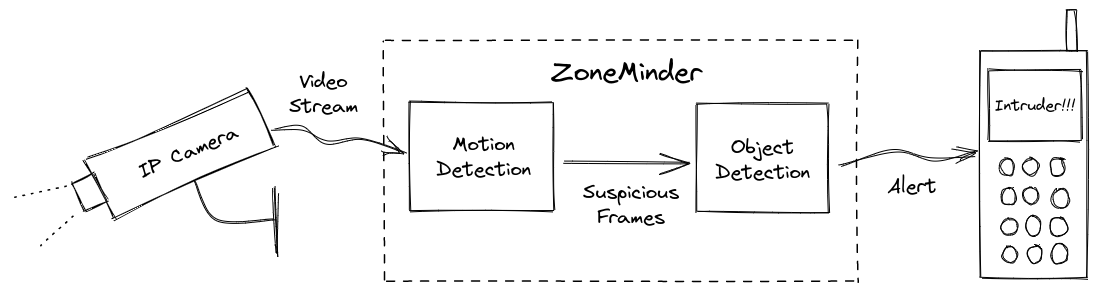
While motion detection is very fast but yields only approximate results, object detection can be very sophisticated and very accurate but also quite slow. If you want fast object detection you need a fast computer to run it on. But then in our little home security system setup, it would probably sit idle most of the time, waiting minutes or hours for the next movement in front of the camera. That’d be quite a waste of resources.
Amazon Rekognition — object detection in the cloud
Enter the cloud. Amazon offers an object-detection service through its AWS platform called Amazon Rekognition. It’s a powerful service that can detect objects (aka “labels”) in still images and in video streams. Rekognition can also detect and compare faces, flag nude or indecent images, recognise celebrities — just in case the Queen pays us a visit — and much more. All that functionality is just a simple AWS API call away, at the cost of $1.00 per 1000 images.
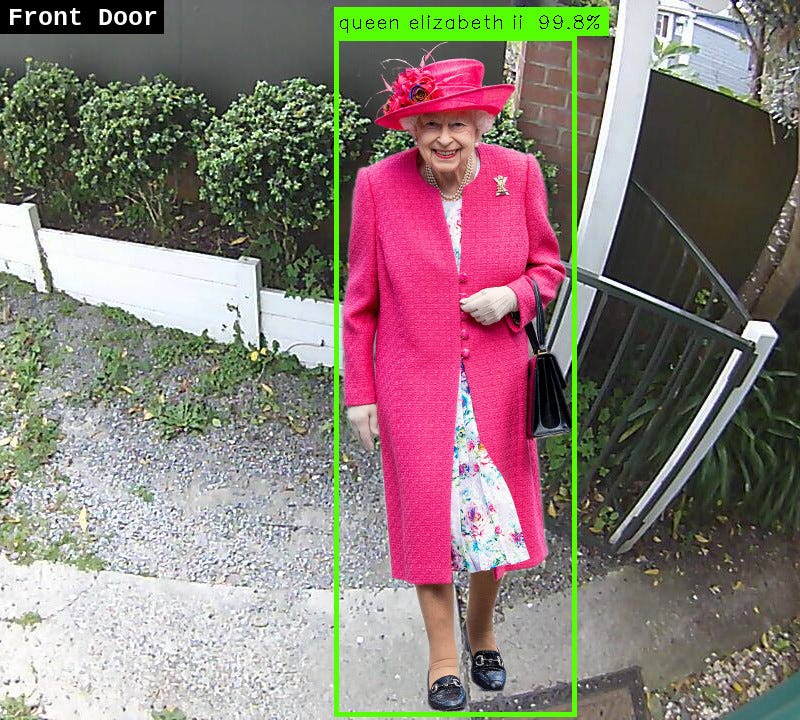
Fake. She actually never dropped by.
ZoneMinder supports object detection through its ZoneMinder Event Server (ZMES), an optional opensource package that can be installed alongside ZoneMinder. For years ZMES could use either one of the supported YOLO neural-network algorithms preferably running on a GPU, or a hardware accelerator called Coral TPU (Tensor Processing Unit).
Now I added support for Amazon Rekognition so you no longer need a powerful GPU or a Coral TPU to detect objects in your security camera feeds.
Using ZM Event Server with AWS Rekognition
Here I assume that you’ve got both the ZoneMinder installed and the latest version of ZoneMinder Event Server installed and configured. You will also need an AWS account, and from there generate the AWS Access Key and Secret Key. Unless of course, you’re running ZoneMinder on an EC2 instance. More about that later.
If you’re not familiar with AWS you can follow my simple guide that I wrote for another service — Amazon Polly. Only instead of attaching the AmazonPollyFullAccess policy look for AmazonRekognitionReadOnlyAccess. Everything else is the same. Keep the generated access and secret keys handy.
ZMES configuration changes
First things first — install the required AWS module for Python called boto3:
[ZoneMinder server] ~ $ sudo pip3 install boto3
Temporary: Until a new official pyzm package with the Rekognition support is released by the maintainer you will need to install my patched version:
[ZoneMinder server] ~ $ sudo pip3 install -U https://github.com/mludvig/pyzm/releases/download/v0.3.53+aws/pyzm-0.3.53+aws-py3-none-any.whl
Now that the prerequisites are completed it’s just a matter of updating the object detection configuration in /etc/zm/objectconfig.ini and adding the AWS keys to /etc/zm/secrets.ini.
First the AWS keys — we have to add them to /etc/zm/secrets.ini as that’s the place where ZMES looks for various credentials.
[ZoneMinder server] ~ $ sudo cat /etc/zm/secrets.ini
...
AWS_ACCESS_KEY_ID=AKIABCDEFGHJKL...
AWS_SECRET_ACCESS_KEY=Ab1Cd2Ef3Gh4...
Now configure ZMES to use the AWS Rekognition service. Look for ml_sequence near the bottom of /etc/zm/objectconfig.ini . Find the block ml_sequence → object → sequence, it will probably contain some YOLO3, YOLO4, or Coral TPU settings. Make it look like this instead:
ml_sequence= {
    'general': {
       # Keep what's there...
    },
    'object': {
      'general': {
          # Keep what's there...
      },
      'sequence': [
        {
          'name': 'AWS Rekognition',
          'object_framework': 'aws_rekognition',
          'object_min_confidence': {{object_min_confidence}},
          'aws_region': 'us-east-1',    # Set to your region
          'aws_access_key_id': '!AWS_ACCESS_KEY_ID',
          'aws_secret_access_key': '!AWS_SECRET_ACCESS_KEY',
          'enabled': 'yes',
        }
      ]
    }
  }
The important settings are:
- object_framework must be aws_rekognition
- aws_region must be set to the region that you want to use, e.g. us-east-1. Not all regions have the Rekognition service available — choose one that does, even if it’s not your local region!
- aws_access_key_id and aws_secret_access_key references to
secrets.ini
If you’re running ZoneMinder on an EC2 instance don’t use the access and secret keys. Comment out the relevant fields in the above config and instead configure an IAM Instance Role with AmazonRekognitionReadOnlyAccess policy. The module will automatically request the credentials from AWS on your behalf. Even in this case you still have to set the aws_region option!
Testing
Now we can run a manual test to make sure that everything runs as expected. Pick a recent Event from your ZoneMinder console, preferably one with a Person in the picture and note its Event ID and the Monitor ID (ie. camera ID).
[ZoneMinder server] ~ $ MONITOR_ID=1
[ZoneMinder server] ~ $ EVENT_ID=12345
[ZoneMinder server] ~ $ sudo -u www-data \
    /var/lib/zmeventnotification/bin/zm_detect.py \
    --monitorid ${MONITOR_ID} --eventid ${EVENT_ID} \
    --config /etc/zm/objectconfig.ini  --reason 'Testing' --debug
Now look for debug messages from aws_rekognition.py …
09/05/21 22:13:22 zmesdetect_m1[4866] DBG1 aws_rekognition.py:25
[|---------- AWS Rekognition (image: 800x450) ----------|]
09/05/21 22:13:22 zmesdetect_m1[4866] DBG2 aws_rekognition.py:40
[Detection response: {'Labels': [{'Name': 'Person', 'Confidence': 99.26924896240234, 'Instances': [{'BoundingBox': {'Width': 0.2804548740386963, 'Height': 0.5215029716491699, 'Left': 0.7154628038406372, 'Top': 0.45989474654197693}, 'Confidence': 99.26924896240234}], 'Parents': []}, ...]
09/05/21 22:13:22 zmesdetect_m1[4866] DBG3 aws_rekognition.py:61
[bbox=(572, 207, 797, 442) / label='person' / conf=0.9926924896]
If you see a similar output then everything is configured correctly, your AWS credentials work and you can restart ZoneMinder to pick up the new configuration.
If you see an error ModuleNotFoundError: No module named ‘boto3’ make sure that you’ve got the boto3 module installed: sudo pip3 install boto3
If you see errors related to credentials or permissions then double-check your access and secret keys and/or the IAM role. Also, make sure that the user or the role has access to the Rekognition service.
And if the error says that you have to configure a region double check that you’ve got aws_region correctly entered in the options.
ZoneMinder on EC2 — show me the numbers
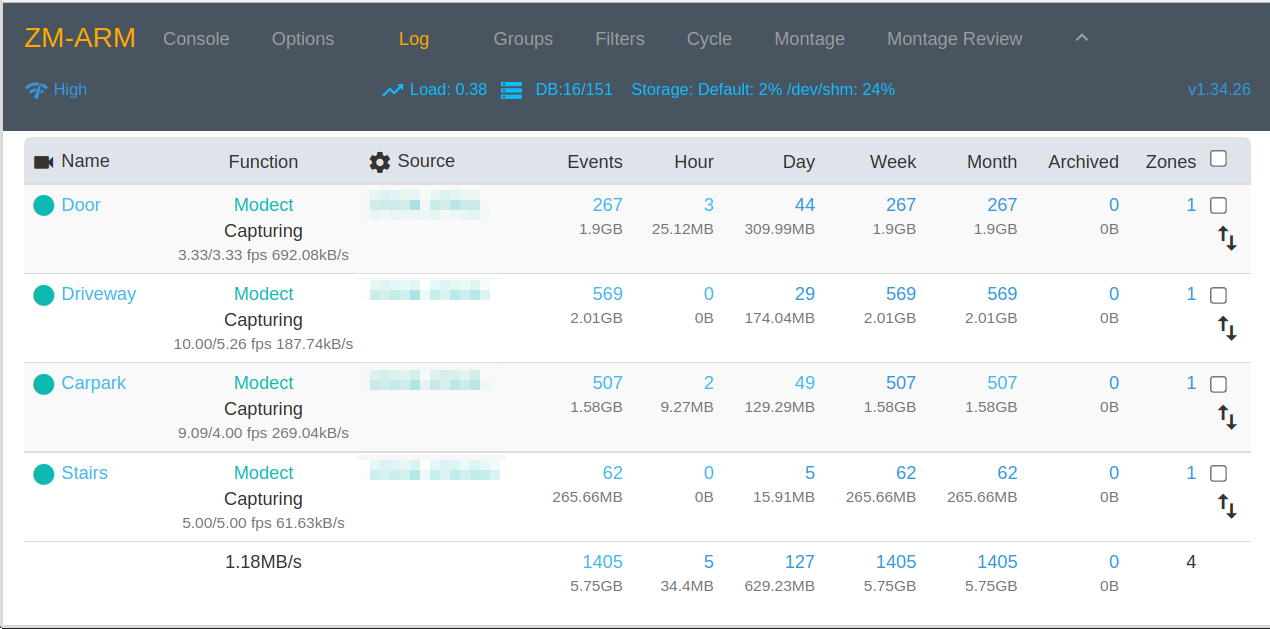
I run my ZoneMinder on an AWS EC2 instance, not on my home server. In part because I don’t want to have my security footage stolen along with the server if it comes to that. Obviously, you need a decent non-metered internet link if you’re planning to stream all your video feeds to the cloud — my 100M/100M residential fibre has no problems supporting 4 cameras.
Before implementing the Rekognition support I had to use a t3.large instance with enough memory for the neural network models and enough power for the occasional need for the CPU cycles during object detection. Smaller instances were getting overloaded from time to time, swapping like crazy, running out of CPU credits and eventually falling over every now and then. Upgrading to t3.large solved the stability and performance issues but at what cost? Around $60/month, not cheap.
Now with Rekognition, I was able to scale down initially to t3.small which costs a quarter of the above large instance and in fact in the end I switched to a Graviton2 (ARM CPU) based t4g.small for some extra 20% off. Now I pay $12/month and the instance is more than powerful enough for my 4 cameras.
But I hear you — now I have to pay for the Rekognition service, right? Is it still worth it?
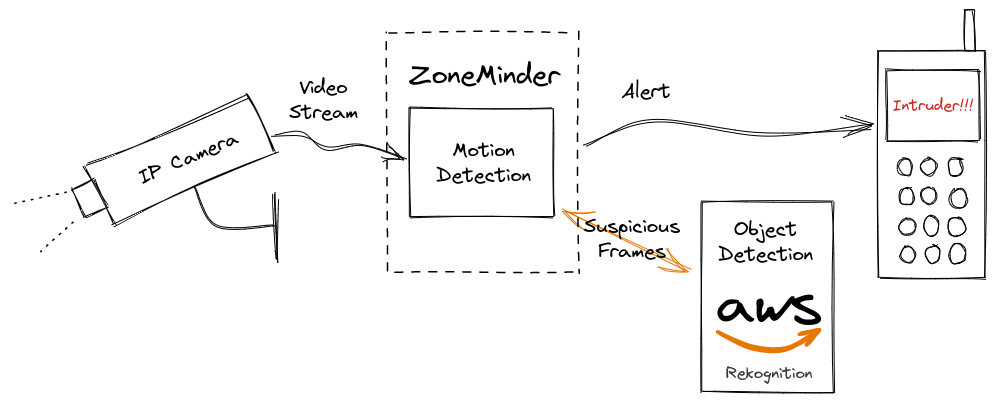
My ZoneMinder registers around 200 events per day, triggered by the naive motion detection described above. That makes around 6000 events per month that we need to analyse to see if there are any objects of interest. Amazon customers can process 5000 images per month for free in the Rekognition Free Tier, which leaves me with only some 1000 images per month to pay for — and that will cost me $1/month. Sometimes a little more, sometimes a little less, but on average it’s going to be around a dollar.
So yes, it’s still very much worth it. Especially in the perspective of the savings achieved by switching from t3.large to t4g.small through offloading the object detection to Amazon.
I love ZoneMinder and I love Amazon Rekognition. And now I love how smoothly they work together. I hope that you have found this new support just as useful as I have.