I switched the AWS account used for Codex inference on Amazon Bedrock. An old chat still opened, but its next turn failed.
The workaround was to remove the old account’s encrypted state from the saved chat. The original messages and tool results stayed in place. Codex could then replay that history without sending the old encrypted data.
Observed outcome: a local test confirmed that the repaired chat produced a request with no encrypted content. I applied the repair with a backup. Live Bedrock inference was not tested during this investigation.
The symptom
I resumed a saved chat:
codex resume <session-id>
The chat loaded. A simple instruction such as commit the changes then produced this error:
{
  "error": {
    "message": "encrypted summary was created for a different account or provider",
    "type": "invalid_request_error",
    "param": null,
    "code": "validation_error"
  }
}
The failure happened when Codex sent the next inference request. The chat transcript was readable.
Inference: the AWS account switch changed the identity used to validate the saved encrypted data. The error identifies an account or provider mismatch. It does not reveal the encryption scheme or the exact key scope.
What the saved chat contains
This case used Codex CLI 0.164.0 with the amazon-bedrock-runtime provider. Its session file was a JSONL rollout under:
~/.codex/sessions/YYYY/MM/DD/rollout-<timestamp>-<session-id>.jsonl
The file held ordinary conversation records and two forms of encrypted state:
- Reasoning records:
response_itemrecords withpayload.type: reasoningand anencrypted_contentfield. They can also contain a visible reasoning summary. - Compaction checkpoints:
compactedrecords whosereplacement_historycontains acompactionitem with encrypted content. On resume, the checkpoint replaces the earlier active history.
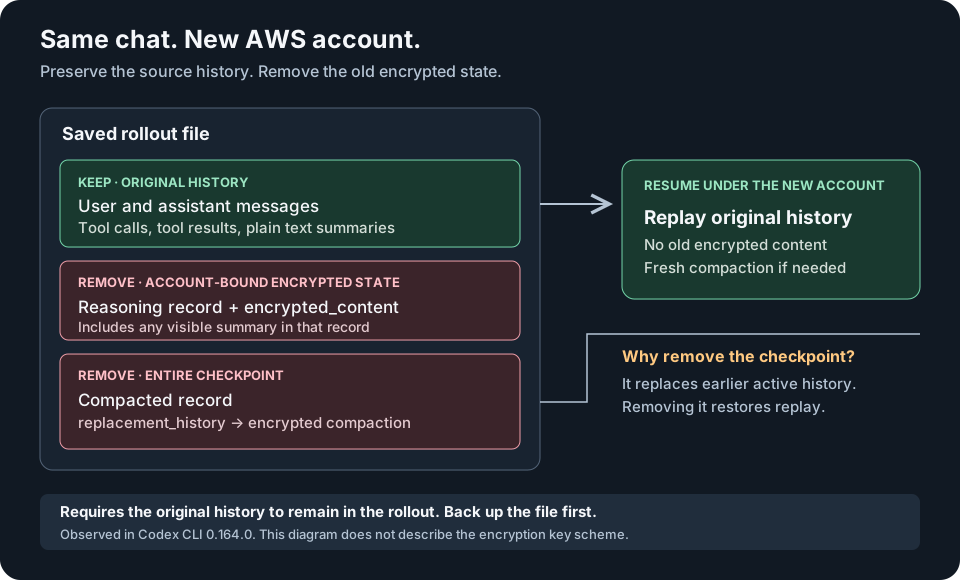
Open the diagram at full size.
The removal applies to entire records. A visible summary inside a removed reasoning record is removed with it. Plain text summaries stored as ordinary messages remain.
Why remove the entire checkpoint?
Removing only the encrypted item from replacement_history would leave the checkpoint in place. Codex could still replace the earlier history with the few messages left in that checkpoint.
In this session, the original records from before compaction were still present. Removing the entire checkpoint let Codex replay them. This preserves the source history without decrypting the old summary.
Risk: if an export or edited session no longer contains that original history, this method cannot recover it. Keep the backup. Use the old account or start a new chat with the available context.
Repair one affected chat
This is a local file workaround for the observed rollout format. I found no documented setting that strips existing encrypted state on resume.
Close the affected chat before editing its file.
- Download codex-session-repair.py.
- Set
SESSION_IDto the affected chat’s UUID. - Locate its rollout file.
CODEX_DIR="${CODEX_HOME:-$HOME/.codex}"
SESSION_ID="your-session-uuid"
SESSION="$(rg --files "$CODEX_DIR/sessions" |
  rg "rollout-.*-${SESSION_ID}\.jsonl$")"
An archived chat can be under $CODEX_DIR/archived_sessions instead. Select one rollout file.
Preview the repair:
python3 codex-session-repair.py "$SESSION"
The script reports which records it would remove. It does not modify the file unless you pass --apply.
Apply the repair:
python3 codex-session-repair.py "$SESSION" --apply
The script saves a backup beside the rollout file. It validates the JSON, preserves the retained lines byte for byte, and checks for remaining encrypted content. It then replaces the file atomically. It refuses the replacement if the file changed during the repair.
Resume with a fresh process:
codex resume --no-daemon "$SESSION_ID"
--no-daemon avoids reusing a shared server that could hold the old history in memory. The larger restored history may need fresh compaction under the new account.
To undo the repair, close the chat and copy the printed backup path over the rollout:
BACKUP="/path/printed/by/the/repair/script.bak"
cp -- "$BACKUP" "$SESSION"
Does disabling reasoning summaries help?
The documented model_reasoning_summary="none" setting controls generated reasoning summaries. It does not remove the old encrypted state from a saved rollout. It does not repair the encrypted compaction checkpoint.
Forking a chat also preserves its history. A new chat ID alone does not remove the account-bound data.
What was verified
The affected rollout was about 13.3 MB. The repair removed:
| Record | Removed |
|---|---|
| Encrypted reasoning records | 331 |
| Encrypted compaction checkpoints | 1 |
The repaired file was about 12.5 MB.
I tested a temporary copy against a local HTTP endpoint. The endpoint captured the request and returned a deliberate error. No request went to Bedrock.
The checks confirmed that:
- Every original message and tool exchange remained unchanged.
- A second repair made no further changes.
- Codex loaded the repaired session.
- The next request contained no encrypted content.
The captured request contained 63 message items, 220 function calls, 220 function results, 12 custom tool calls, and 12 custom tool results. The deliberate endpoint error ended the test.
Unknown: this test did not prove that Bedrock accepted a live turn or completed a commit. It verified that the old encrypted data was absent from the resumed request.
For this case, the local recovery is complete. The next step is to resume the chat under the new AWS account and send a normal instruction.
References
The record counts and replay behaviour above come from this local investigation. They describe Codex CLI 0.164.0 and this session file.